POD 2.0 in SAP Digital Manufacturing
How modern shopfloor interfaces improve acceptance, data quality and process efficiency
Are you looking to successfully establish SAP Digital Manufacturing on the shopfloor and improve your production processes with modern, intuitive operating concepts?
FORCAM ENISCO guides you through the implementation, design and optimization of SAP Digital Manufacturing – from process analysis and POD conception to successful deployment on the shopfloor.
Together we develop an operating concept that is technically convincing, meaningfully supports your processes and is accepted and used by your employees in their daily work.
Request a no-obligation quote for SAP DM implementation
Executive Summary
Digitalization in manufacturing is often associated with system architecture, interfaces and cloud strategies. However, the real benefit is created where production happens every day: on the shopfloor.
What counts here is whether employees can quickly find the right order, receive clear work instructions, unambiguously identify inspection criteria and have relevant information available without lengthy searching. At the same time, shift leads need to identify early on where orders are stalling, machines are standing still or interventions are needed.
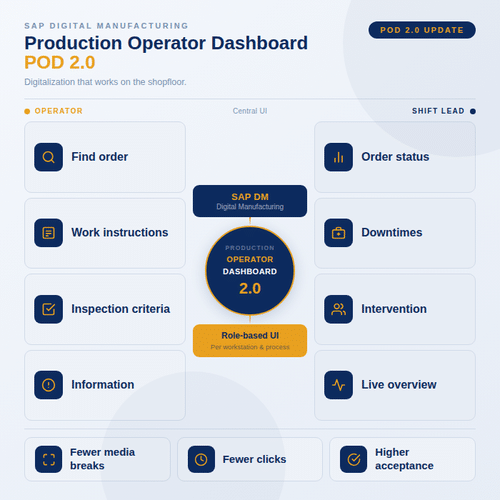
This is exactly where the Production Operator Dashboard (POD) in SAP Digital Manufacturing comes in. It is the central user interface for production and makes digital manufacturing processes visible, understandable and operable in everyday working life.
With POD 2.0, this interface becomes more modern, more flexible and better tailored to specific roles, workstations and process steps. This reduces media breaks, queries, clicks and data entry errors and increases acceptance among the people who work with the system every day.
1. Shopfloor User Experience in SAP DM: Digitalization must work where production happens
Many manufacturing companies invest in modern MES, cloud and SAP solutions to increase transparency, efficiency and standardization. In practice, however, digitalization does not begin in management reporting – it begins directly at the workstation in production.
An assembly worker must quickly identify which order comes next, which work steps are pending, which inspections are required and what feedback is expected. This is exactly where shopfloor UX (User Experience) becomes critical: it describes how simply, clearly and efficiently employees can work with the Production Operator Dashboard (POD).
If too many clicks, irrelevant information or unclear process steps disrupt the workflow, the system quickly becomes perceived as a burden. The success of SAP Digital Manufacturing therefore depends heavily on how well the digital interface is integrated into everyday working life. This is exactly where POD 2.0 comes in.
2. Typical Challenges
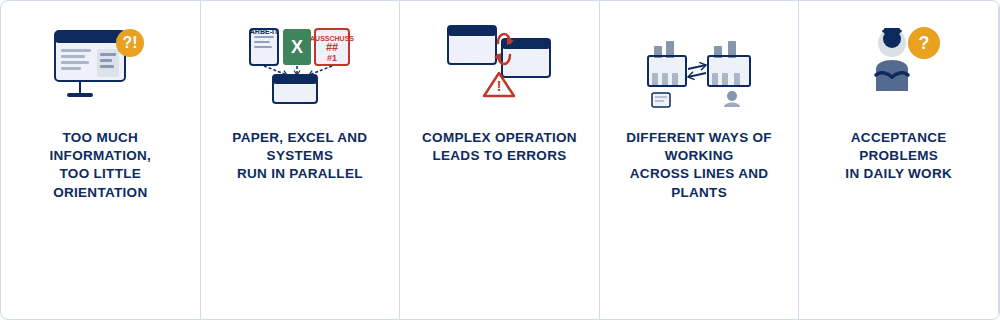
2.1 Too much information, too little orientation
On the shopfloor, clarity counts. Employees must quickly recognize what needs to be done. In many systems, however, they see too much technical information at once: order numbers, material numbers, status values, quantities, operations, buttons, tables and messages.
For an experienced key user, this may be understandable. For a worker on the early shift who is just preparing a line, it can seem unnecessarily complicated.
Example from the early shift: An employee wants to start the next production order. On the screen he sees several open orders, status messages and possible actions.
Instead of getting straight to work, uncertainty arises: What is the right next step? He asks the shift lead, who is pulled away from another task as a result. The order starts later than planned – not due to lack of motivation, but because the interface does not guide clearly enough.
Such situations seem small individually. Across many shifts, lines and plants, however, they add up to real efficiency losses.
2.2 Paper, Excel and system run in parallel
In many production environments, digital and analog processes exist side by side. The work instruction is on paper at the line. The quality inspection is noted on a form. Scrap is collected on a whiteboard. Production progress is entered into the system later.
This leads to media breaks and unnecessary duplication of effort.
Example from the shopfloor: A worker finds that several parts need rework. Since it is not clear where the rework should be recorded in the system, he first notes the quantity on a piece of paper.
At the end of the shift, the information is entered retrospectively. Valuable context is lost in the process: Was it rework, scrap or a process deviation? A small uncertainty becomes a data quality problem.
The result: data in the system is inaccurate. Analysis the next day becomes difficult – production knows something happened, but no longer exactly when, where and why.
With POD 2.0, rework, scrap or deviations can be recorded directly in the workflow. This creates better data, more transparency and faster root cause analysis.
2.3 Complex operation leads to errors
Digital systems are supposed to make processes safer. But when operation is too complicated, new sources of error can arise.
Quality inspection example: An employee must document a quality inspection after every tenth part. The inspection instruction is available in the system, but is not directly visible in the workflow.
In a stressful shift, he has to switch between views, search for inspection criteria and then return to the feedback. What was intended as a routine inspection quickly becomes an interruption – and in the worst case is forgotten or only retrospectively documented in bulk.
The consequence: data quality falls while the risk for quality, traceability and compliance rises. Especially in regulated or quality-critical industries, it is not enough for information to be available somewhere in the system. It must be visible exactly where the user needs it in the workflow.
This is where POD 2.0 demonstrates its added value: the interface can guide the employee purposefully through the process, display relevant inspections at the right time and enable necessary feedback directly in the working context. This turns pure system operation into active process support with fewer errors, better data quality and more certainty in shopfloor everyday life.
2.4 Different working practices across lines and plants
Many companies have developed their own working practices over the years. In Plant A, scrap is documented differently than in Plant B. Line 1 uses paper forms, Line 2 works partially digitally. One location has experienced key users, another needs significantly more support.
These differences make SAP Digital Manufacturing rollouts considerably more difficult. Without standardized operating concepts, coordination, testing and training effort increases per location. At the same time, comparability of central KPIs such as scrap rate, rework rate, downtime, OEE, First Pass Yield and data completeness decreases.
Typical rollout scenario: The first plant is successfully connected, but with many local adaptations. With the second plant it becomes clear: similar processes are named, documented or controlled differently.
Without standardized operating concepts, new special solutions quickly emerge. The project team loses valuable time in recurring discussions about interfaces, buttons and mandatory fields instead of efficiently driving the rollout forward.
With POD 2.0, these processes can be more strongly standardized and users clearly guided through each work step. Feedback is recorded more uniformly, sources of error reduced and relevant production data documented directly where it is created.
This improves data quality and creates a reliable basis for cross-site analyses, well-founded decisions and scalable rollouts. At the same time, complexity decreases, additional plants can be connected more quickly and global production KPIs become significantly more comparable.
2.5 Acceptance problems arise in everyday life
Acceptance problems rarely arise because employees are fundamentally opposed to digitalization. They often arise when a system does not help in everyday life.
Typical statements from production might include:
- “It takes me longer than before.”
- “I don’t know where to click.”
- “The information I need isn’t directly visible.”
- “I still have to document it on paper.”
- “The system seems made for the office, not the line.”
When such perceptions arise, the system is bypassed or used only reluctantly. Feedback is entered late, data is incomplete and the expected benefits fail to materialize.
For SAP Digital Manufacturing, this is particularly critical because many benefits depend directly on current and correct shopfloor data.
3. The Solution: POD 2.0 in SAP Digital Manufacturing
3.1 The POD as a digital workstation on the shopfloor
The Production Operator Dashboard is the central interface with which employees work in SAP Digital Manufacturing. It can be understood as a digital workstation for the shopfloor.
Via the POD, the user can see, for example:
- which order should currently be processed,
- which operation is pending,
- which work instruction is relevant,
- what quantity has been produced,
- which quality inspection is necessary,
- whether scrap or rework must be recorded,
- whether a disruption or deviation should be documented.
This makes the POD not just a screen in the system. It is the direct connection between the real production process and the digital mapping in SAP Digital Manufacturing.
With POD 2.0, this connection is more strongly oriented towards people. The interface can be designed so that it supports the workflow instead of interrupting it. Users are guided more clearly through the individual process steps, feedback is recorded more uniformly and relevant production data is documented directly where it is created.
POD 2.0 thus not only improves usability on the shopfloor and thereby increases user acceptance – it also strengthens data quality, the comparability of central production KPIs and the basis for cross-site analyses.
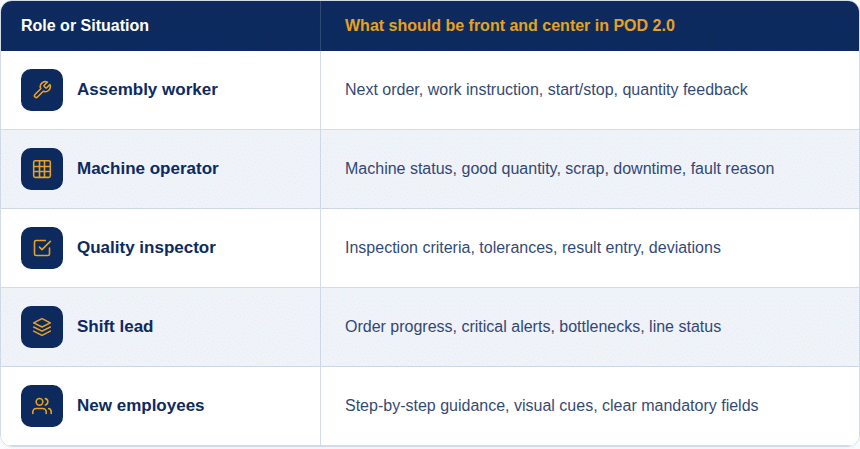
3.2 Role-based interfaces: everyone sees what they really need
Not every employee on the shopfloor needs the same information. A line worker wants to know which order to process and which work steps are necessary. A quality inspector needs inspection criteria, limit values and documentation options. A shift lead needs an overview of order status, bottlenecks and deviations.
POD 2.0 makes it possible to better map these different requirements.
3.3 Example: The worker starts an order
A worker arrives at the line at the start of his shift. In the POD he directly sees the next released order. The interface does not show him ten different technical options, but clearly shows the next step: select order and start operation.
After starting, the appropriate work instruction automatically opens. The worker sees which material must be used, which assembly steps are relevant and whether special notes must be observed. If an inspection is required, it appears directly in the workflow.
He does not have to search in folders, open a separate Excel list or ask a colleague where the current version of the instruction is. The information is where the work happens. This reduces search time, avoids errors from outdated documents and gives the employee confidence in the process.
3.4 Example: Quality data is recorded directly in the process
In another scenario, a quality inspection must be carried out after a certain quantity. Previously, the inspection was documented on paper and transferred later. This repeatedly led to missing entries or unclear timestamps.
With POD 2.0, the inspection can become directly visible in the workflow. The worker or quality inspector sees which characteristic must be inspected, which value is to be entered and whether the result is within tolerance.
If a value is outside tolerance, a deviation can immediately be documented or an escalation triggered. The advantage: quality is not managed retrospectively, but secured directly in the production process.
3.5 Example: Scrap and rework are clearly distinguished
Scrap and rework are a sensitive topic in many production environments. When recording is unclear, inaccurate data arises. Was a part really scrapped? Does it need rework? Is the cause known? Does it affect material, machine or operation?
A clearly configured POD can help here. The employee receives simple selection options and is guided through the recording. Instead of free text on a piece of paper, there are structured inputs: quantity, type of deviation, reason, affected step and comment if applicable.
This creates better data for later analyses. Production can identify which types of errors occur frequently, at which line they arise and which measures are effective.
3.6 Customizations closer to the shopfloor instead of long development cycles
Production processes change. New products are introduced, inspection requirements change, workstations are reorganized or a plant wants to present certain information differently.
With POD 2.0, customizations can be implemented more quickly and closer to the specialist department. This is particularly valuable because the best input often comes from the people who work with the system every day.
Example after go-live: A team from production reports back that a certain button is placed too far down and is searched for multiple times every shift. Additionally, a visual highlight is missing when a quality inspection is due. Instead of turning this into a lengthy development project, the POD layout can be specifically adjusted. The interface improves, the process remains standardized and acceptance increases because feedback from the shopfloor is visibly implemented.
3.7 Standardization without ignoring the shopfloor
POD 2.0 helps companies create standards without having to treat every workstation the same. This is decisive for larger rollouts.
A company can, for example, define a global template for production feedback. This template contains central standards: start order, report quantity, record scrap, document inspection, close operation.
At the same time, individual roles or lines can receive specific additions. An assembly line may need different information than a packaging line. A quality workstation needs different information than a pure production workstation.
This creates a sensible middle ground: global structure, local usability.
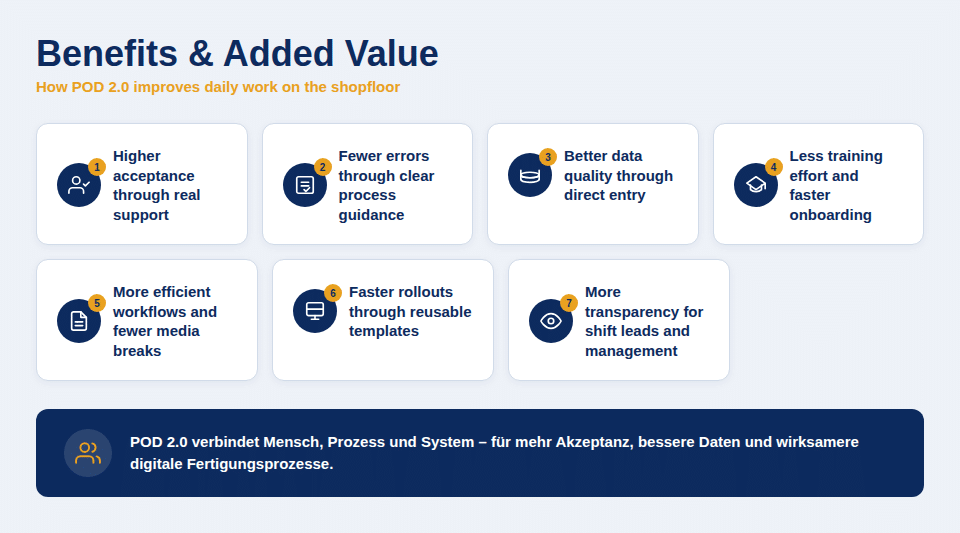
4. Benefits and Added Value
Higher acceptance through real support
POD 2.0 brings the system closer to the actual work situation. Employees do not have to think for long about which system function to use – they are guided clearly through the process. “I still have to enter something in the system” becomes “The system shows me the next right step.” This is exactly how acceptance is created: not through theory, but through noticeable relief in everyday working life.
POD 2.0 creates acceptance by clearly guiding employees through the process in their daily work and turning system operation from an additional task into real support.
Fewer errors through clear process guidance
Mandatory fields, prompts, inspections and feedback can be integrated directly into the workflow. Important steps are therefore not forgotten, but required at the right moment. Quality is not controlled retrospectively, but secured directly in the process.
POD 2.0 reduces errors by making important process steps visible at exactly the right moment and securing quality directly in the workflow.
Better data quality through direct entry
Quantities, downtimes, scrap or rework are documented where they arise – directly on the shopfloor. This makes production data more current, more accurate and more reliable. Shift leads, quality managers and management receive a more dependable basis for analyses, decisions and improvement measures.
Direct entry on the shopfloor creates more current and reliable production data, enabling better analyses, faster decisions and targeted improvements.
Less training effort and faster onboarding
An intuitive POD facilitates the onboarding of new employees. They do not have to know all system functions immediately, but are guided step by step through their tasks. This reduces queries, relieves experienced colleagues and helps new employees become productive more quickly.
An intuitive POD accelerates onboarding because new employees are guided step by step through their tasks and can work safely and productively more quickly.
More efficient workflows and fewer media breaks
POD 2.0 more strongly bundles work instructions, inspections, feedback and deviations in one interface. This reduces search time, duplicate entry and transfer errors. At the same time, feedback becomes faster, order status more transparent and coordination between production, quality and shift management more efficient.
By bundling central process steps in one interface, POD 2.0 reduces media breaks, accelerates feedback and makes collaboration between production, quality and shift management more efficient.
Faster rollouts through reusable templates
For companies with multiple plants, POD 2.0 is also strategically relevant. Proven interfaces can be used as templates for additional lines or locations and specifically adapted. This accelerates rollouts, reduces project effort and strengthens global standards.
Reusable POD templates accelerate rollouts across multiple plants, reduce project effort and ensure consistent global standards.
More transparency for shift leads and management
Clean and timely feedback makes problems visible earlier. Shift leads recognize more quickly where backlogs, disruptions or quality deviations are arising. Management and production leadership receive more current KPIs on order progress, scrap, rework or downtime – and can make well-founded decisions more quickly.
Timely feedback creates more transparency on orders, disruptions and quality deviations, so that shift leads and management can make well-founded decisions more quickly.
5. Practical Example: A Working Day with POD 2.0
Let us imagine an assembly line where several product variants are manufactured.
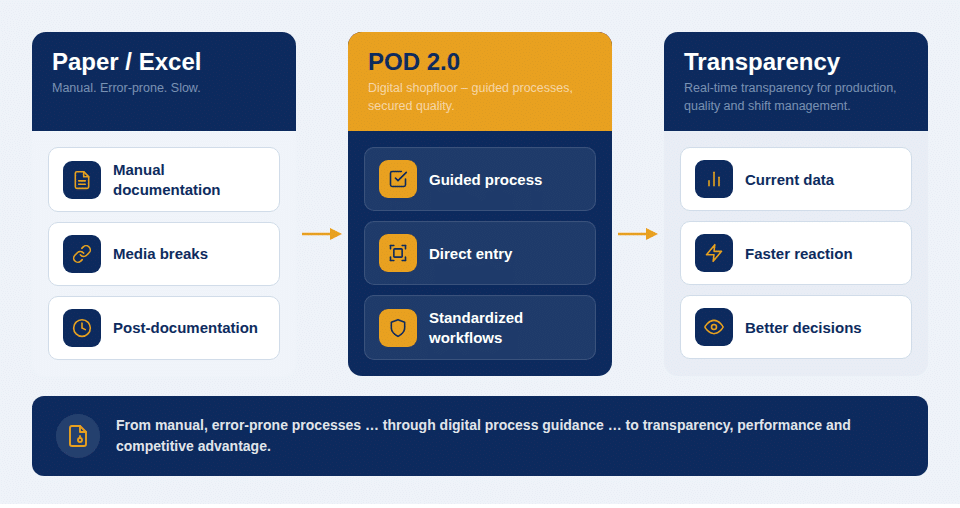
Before: Work instructions were in paper form at the line. Quality inspections were documented on forms. Production quantities, scrap or rework were often only entered at the end of the shift. Information was thus distributed, time-delayed and not always clearly traceable.
After with POD 2.0: At the start of the early shift, the worker logs in at the POD. He directly sees the next order, the associated operation and the relevant work steps. The interface clearly guides him through the process: start order, check material, open work instruction.
When a quality inspection falls due during assembly, it appears directly in the work process. The worker sees which characteristic must be inspected, enters the value and can continue the process if the result is within tolerance.
If an error later occurs on several parts, the deviation is recorded in a structured way in the POD: rework, affected quantity, suspected cause and comment. The shift lead sees the notification promptly and can react directly.
At the end, the worker reports back the good quantity and closes the operation. The order status is automatically updated. Quality, production and shift management work with the same, current data.
The difference from the old process is clear:
- no searching for paper documents,
- no retrospective entry from memory,
- less uncertainty in operation,
- better quality of feedback,
- faster response to deviations,
- greater transparency for all involved.
This example shows: POD 2.0 does not just improve the interface. It improves the way people, processes and data work together on the shopfloor.
6. Success Factors for Implementing POD 2.0
6. Success Factors for Implementing POD 2.0
A POD should not be designed exclusively in the project office. The best input often comes from the people who work at the line every day.
Therefore, workers, shift leads, quality managers and key users should be involved early. They know which information is really needed, which steps cost time today and where errors arise.
Helpful questions are:
- What must the worker see in the first 30 seconds?
- What information is searched for or requested today?
- Which feedback is frequently recorded incorrectly or late?
- Where do media breaks occur?
- Which steps are particularly critical for quality or compliance?
6.2 Do not overload the POD
A frequent mistake with digital interfaces is the desire to display as much information as possible. On the shopfloor, less is often more.
A good POD is not the POD with the most functions. A good POD is the POD that shows the right information at the right moment. This means: clear buttons, understandable terms, logical sequence and as little distraction as possible.
6.3 Define standards but allow feedback
Standards are necessary for rollouts. Without standards, too many individual variants arise. At the same time, standardization must not mean that real requirements are ignored.
A sensible approach is a template with clear guardrails. Within these guardrails, improvements from the shopfloor can be incorporated. This keeps the POD scalable while remaining practical.
6.4 Actively consider change management
POD 2.0 can significantly facilitate acceptance. Nevertheless, employees need orientation. They must understand why processes are changing and what benefit the new system has.
Important factors are:
- early communication,
- involvement of key users,
- short, practice-oriented training,
- tests directly at the workstation,
- feedback rounds after go-live,
- visible support from shift management and leadership.
Especially small improvements after go-live have a strong effect. When employees see that their feedback is taken seriously, willingness to actively use the system increases.
6.5 Ensure governance for customizations
The flexibility of POD 2.0 is a major advantage. At the same time, it requires clear rules. Not every local requirement should automatically lead to a separate interface.
Companies should define:
- who may carry out POD customizations,
- which standards are mandatory,
- how changes are tested,
- how feedback is prioritized,
- how templates are versioned,
- which customizations are permitted locally and which are decided globally.
This keeps POD 2.0 flexible without becoming confusing in the long term.
7. Conclusion
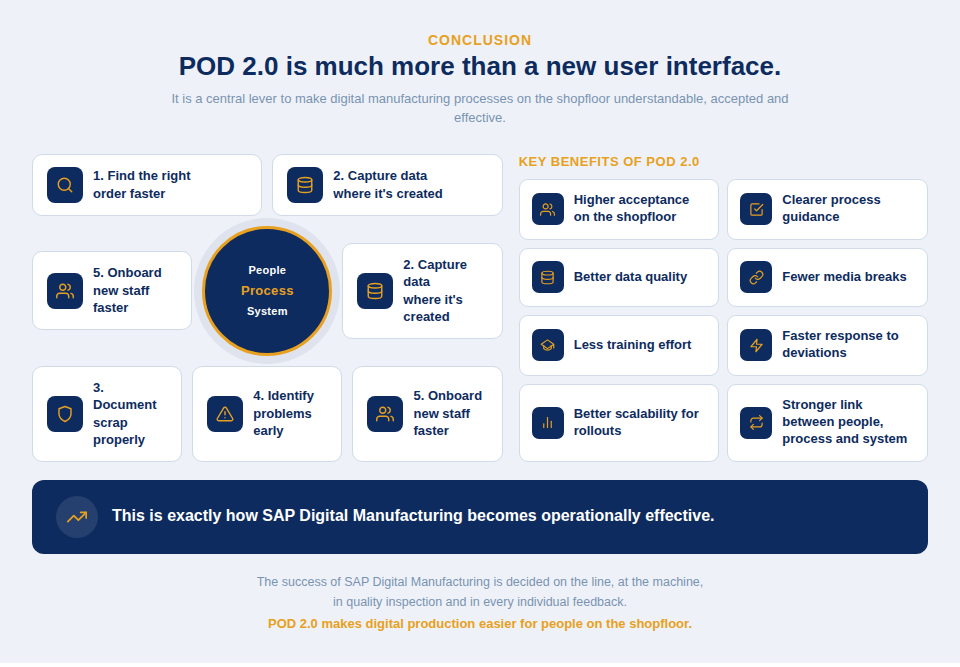
POD 2.0 in SAP Digital Manufacturing is much more than a new user interface. It is a central lever for making digital manufacturing processes on the shopfloor understandable, accepted and effective.
The real added value is not apparent in theory, but in everyday life:
A worker finds the right order more quickly. Data is recorded where it is created. Scrap is properly documented. The shift lead recognizes earlier where a problem is arising. New employees find their way around more quickly.
This is exactly how SAP Digital Manufacturing becomes operationally effective.
The most important benefits of POD 2.0 are:
- higher acceptance on the shopfloor,
- clearer process guidance,
- better data quality,
- fewer media breaks,
- less training effort,
- faster response to deviations,
- better scalability for rollouts,
- stronger connection between people, process and system.
The success of SAP Digital Manufacturing is not decided only in the cloud, in the ERP or in the project plan. It is decided at the line, at the machine, in quality inspection and in every individual feedback.